Web hosting decisions are
often made the wrong way: you find the cheapest deal, the most aggressively
advertised plan, or the one your developer friend happens to use. Months later,
you discover your site is slow, crashes under traffic spikes, or you are
massively overpaying for resources you do not need.
This guide cuts through
the marketing noise and helps you match your website's actual requirements —
traffic, technology, budget, and technical expertise — to the right type of
hosting plan. Understanding hosting types is not just a technical detail; it
directly affects your site's speed, uptime, and your monthly costs.
The Main Types of Web Hosting Explained
Shared Hosting
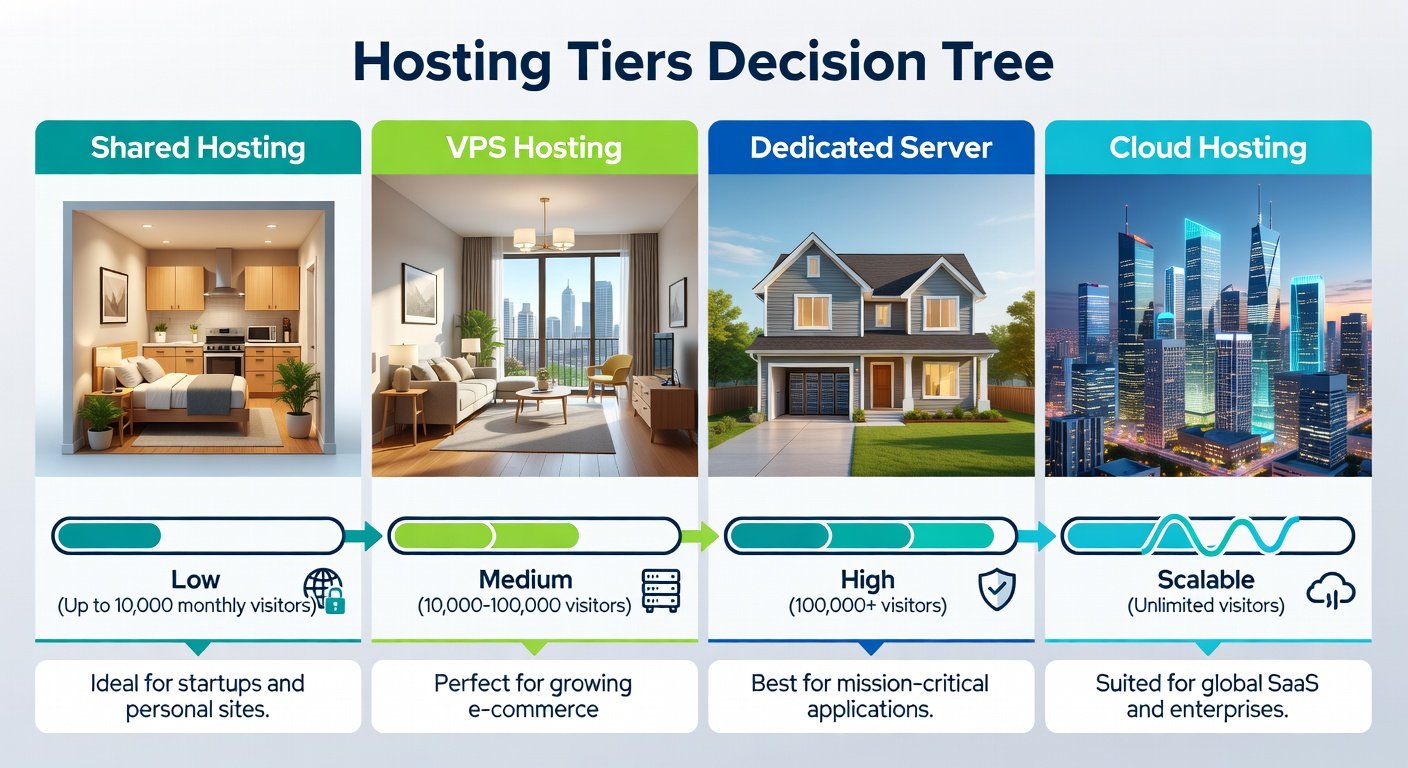
Shared hosting puts your
website on a server with hundreds or thousands of other websites, all sharing
the same CPU, RAM, and storage. It is the cheapest option — typically $3-10 per
month. The downsides are significant: if another site on your shared server
gets a traffic spike, your site slows down too. Resources are limited. You
typically cannot install custom software. Server configuration is fixed. Shared
hosting is appropriate for: personal blogs with low traffic, static websites,
portfolio sites with no e-commerce, and new websites still building an
audience.
VPS Hosting (Virtual Private Server)
A VPS gives you a
dedicated slice of a physical server. Your resources (CPU, RAM, disk) are
guaranteed and not shared with other users. You have root access and can
install any software. Performance is dramatically more predictable than shared
hosting. Costs range from $15-80 per month depending on resources. A VPS
requires more technical knowledge — you are responsible for server security,
software updates, and configuration. If you are not comfortable with Linux,
managed VPS or managed WordPress hosting is a better choice. Appropriate for:
growing websites with moderate traffic, small e-commerce stores, multiple
websites, applications with custom server requirements.
Managed WordPress Hosting
Managed WordPress hosting
(offered by Kinsta, WP Engine, Flywheel, SiteGround) is optimized specifically
for WordPress. The host handles WordPress updates, security scanning, backups,
and server configuration. They use WordPress-specific caching systems and
infrastructure. The cost is higher than shared hosting ($25-100+/month) but the
performance and support are significantly better. Appropriate for: business
WordPress sites, e-commerce on WooCommerce, WordPress sites where you want performance
without server management.
Cloud Hosting
Cloud hosting (AWS, Google
Cloud, DigitalOcean, Vultr, Linode) runs your website across a network of
servers rather than a single machine. You pay for exactly what you use, scaling
automatically. Downtime from hardware failure is virtually eliminated because
traffic instantly moves to other servers. The trade-off is complexity — setting
up cloud hosting requires significant technical knowledge. Appropriate for:
high-traffic applications, applications with variable traffic spikes,
development teams with DevOps expertise, SaaS products.
Dedicated Server
You lease an entire
physical server exclusively for your website. Maximum performance and complete
control. Expensive ($100-500+/month). In 2025, cloud hosting delivers
comparable or better flexibility and reliability at lower cost — dedicated
servers are mainly relevant for compliance requirements (some industries
require physical server isolation) or extremely high-traffic sites with
predictable load.
How to Evaluate Your Actual Hosting Needs
Step 1: Estimate Your Traffic
Check your Google
Analytics for monthly sessions. Under 10,000 sessions/month: shared hosting is
sufficient. 10,000-100,000 sessions: VPS or managed WordPress. Over 100,000:
cloud hosting or high-tier managed hosting. Note that traffic character matters
too — a blog with 50,000 views of static posts is less demanding than an
e-commerce store with 5,000 product page loads and checkout processes.
Step 2: Identify Your Technology Requirements
Basic PHP/WordPress sites
run fine on shared or managed hosting. Custom Node.js, Python, Ruby, or other
non-PHP applications typically need a VPS or cloud server. Applications with
specific system dependencies, custom daemons, or WebSocket requirements need
VPS or cloud minimum. Database-intensive applications or applications requiring
specific database versions need VPS or cloud.
Step 3: Assess Your Technical Comfort Level
Comfortable with Linux
command line, server security, and nginx/Apache configuration → VPS or cloud.
Not comfortable with server administration but need performance → managed
hosting. Building a first website or blog → shared hosting. The wrong match
here is very common — developers often recommend VPS to non-technical clients,
who then struggle to maintain it securely.
Key Hosting Features to Evaluate
Uptime guarantee — look
for 99.9% or better, and check independent reviews rather than marketing
claims. Server location — hosting servers geographically close to your primary
audience reduces latency. Backup policy — how often, how many days of history,
how easy is restoration? Support quality — test their support before
committing. SSL certificate — should be free and auto-renewing (Let's Encrypt).
Scalability — can you easily upgrade as your site grows?
Hosting Plans to Avoid
Avoid any shared hosting
plan promising 'unlimited' everything — bandwidth, storage, emails. These plans
are never truly unlimited; they have hidden resource caps that trigger
throttling or termination. Avoid long-term commitments with providers you have
not tried — many hosting companies offer rock-bottom first-year prices but
expensive renewal rates. Always check the renewal price. Avoid hosting with
very poor independent reviews for uptime or support, regardless of price.
Recommended Providers by Category
Shared hosting for
beginners: SiteGround, Hostinger. Managed WordPress: Kinsta, WP Engine
(premium) or SiteGround (mid-tier). VPS: DigitalOcean, Vultr, Linode (requires
technical knowledge). Cloud: AWS, Google Cloud, DigitalOcean App Platform
(managed option). Budget VPS with managed options: Cloudways (manages
DigitalOcean/AWS infrastructure with a simpler interface at a premium).
Conclusion
Choosing the right hosting
plan means honestly assessing your traffic, technical requirements, and your
own server administration skills. Underpaying on hosting shows in poor
performance and reliability. Overpaying wastes money on resources you do not
need. Use the framework in this guide — traffic estimate, technology needs,
technical comfort — and you will make a well-informed decision that serves your
website for years.