You decide to add
TypeScript to a project for the first time, and suddenly your perfectly working
JavaScript code is covered in red squiggly lines. Error messages like 'Type
string is not assignable to type number' or 'Object is possibly undefined'
start appearing everywhere. TypeScript feels like it is working against you.
The thing is, TypeScript
errors are almost always correct — they are telling you about real potential
problems in your code. The challenge is learning to read them and knowing the
right fix. This guide explains the most confusing TypeScript errors in plain
English and shows you exactly what to do about each one.
How TypeScript Works: The Mental Model
TypeScript adds a type
system on top of JavaScript. Types describe the shape of values — what
properties they have, what functions accept and return. The TypeScript compiler
checks your code against these type descriptions at compile time (before it runs),
catching entire categories of bugs that would only surface as runtime errors in
plain JavaScript. When TypeScript gives you an error, it is not being pedantic
— it has found a place in your code where reality (the type of a value) does
not match your assumption (how you are using it).
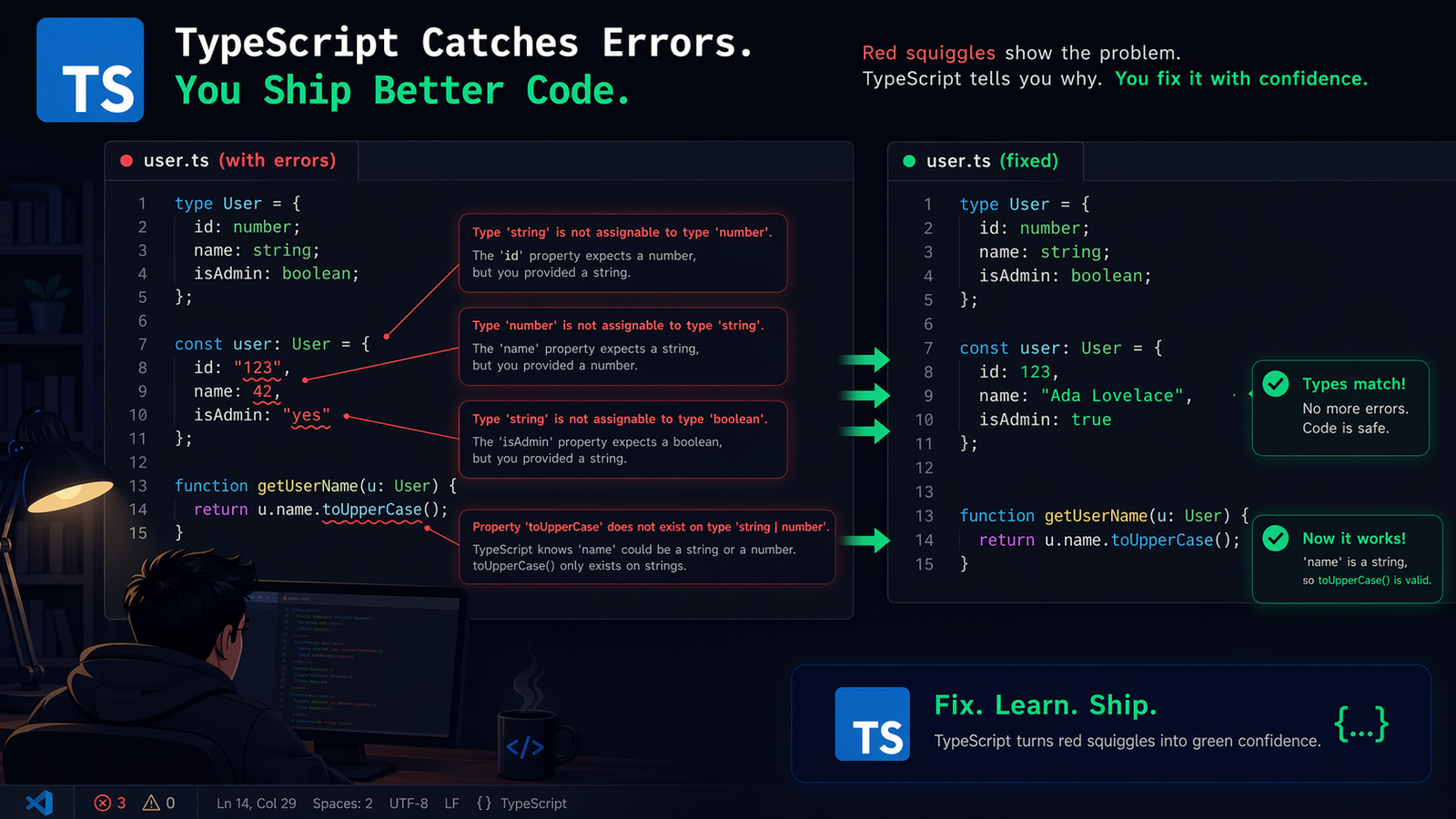
Error 1: Type 'X' is not assignable to type 'Y'
The most fundamental
TypeScript error. You tried to put a value of one type into a place that
expects a different type. Example: you defined a variable as let count: number =
0 and then tried to set it to count = 'five'. TypeScript correctly identifies
that 'five' is a string, not a number. The fix depends on context: if the type
annotation is wrong, change it. If the value is wrong, fix the value. If you
genuinely need a variable to hold multiple types, use a union type: let value:
number | string = 0 — this tells TypeScript the variable can hold either a
number or a string.
Error 2: Object is possibly 'null' or 'undefined'
TypeScript strict mode
(which you should use) does not allow accessing properties of values that might
be null or undefined. Example: const element = document.getElementById('btn')
returns HTMLElement | null — TypeScript correctly points out you cannot call
element.click() without first checking it exists. Fixes: Guard check — if
(element) { element.click(); }. Non-null assertion operator — element!.click()
(you are asserting to TypeScript that you know it is not null — use sparingly).
Optional chaining — element?.click() (only calls click if element is not null
or undefined).
Error 3: Property does not exist on type
You tried to access a
property that TypeScript does not know exists on that type. Common causes: typo
in the property name (TypeScript catches this — this is one of the most
valuable things it does), accessing a property that does not exist in the type
definition, or accessing a property on a base type that only exists in a
subtype. Fix: check your spelling carefully. If the property truly should
exist, add it to the type or interface definition. If accessing a property that
only exists on a specific subtype, use a type guard (instanceof check or a
typeof check) to narrow the type.
Error 4: Argument of type 'X' is not assignable to parameter of type 'Y'
You called a function with
an argument of the wrong type. This is TypeScript verifying that functions are called
correctly. For example, a function defined as function greet(name: string):
void cannot be called with greet(42). The fix: either change what you are
passing in (pass a string, not a number) or change the function's type
signature if it should genuinely accept multiple types (use a union type or
overloads).
Error 5: No overload matches this call
Some functions have
multiple signatures (overloads) for different argument combinations, and
TypeScript cannot match your call to any of them. This commonly occurs with DOM
methods that return different types based on arguments, or third-party library
functions with complex overloads. Fix: check the function's documentation or
type definition to see exactly what argument combinations are valid. Often the
issue is passing an optional argument incorrectly or using the wrong
combination of argument types.
Error 6: Type 'any' implicitly
In strict mode, TypeScript
requires all variables and function parameters to have explicit types. When it
cannot infer a type, it will error rather than silently use 'any'. This error
often appears when you declare a variable without a value (let myVar;) —
TypeScript cannot know the type yet. Fix: add a type annotation: let myVar:
string = ''. For function parameters, always add types: function process(data:
unknown). Avoid using 'any' as a fix — it defeats the purpose of TypeScript.
Use 'unknown' when the type is genuinely unknown, then narrow it before using.
Error 7: Cannot use 'X' as a value because it was exported using 'export type'
This occurs when you try
to use a type that was exported with export type at runtime. Types are
compile-time only and are erased from the JavaScript output. You cannot use
them as values (e.g., passing them to functions that expect runtime values). The
distinction between runtime values (classes, objects, functions) and
compile-time types (interfaces, type aliases) is important to understand.
Practical Strategies for Working with TypeScript
Start with Strict Mode
Enable strict: true in
your tsconfig.json from day one. Strict mode catches more problems but gives
you more errors initially. The errors are worth it — they reveal real issues in
your code.
Avoid Type Assertions as Default Fixes
The as keyword (e.g.,
const value = someVar as string) tells TypeScript to trust you about the type.
Overusing type assertions defeats the purpose of TypeScript — you are back to
trusting yourself rather than having the compiler verify correctness. Use
assertions only when you genuinely have information the compiler cannot infer.
Learn to Write Type Guards
Type guards are functions
that narrow a type in a block of code. typeof x === 'string' is a built-in type
guard. You can write custom ones: function isUser(obj: unknown): obj is User {
return typeof obj === 'object' && obj !== null && 'name' in
obj; }. Using type guards properly lets you access type-specific properties
safely after narrowing.
Conclusion
TypeScript errors are your
compiler trying to help you. Understanding what each error is actually saying
makes the difference between fighting TypeScript and leveraging it. Read errors
carefully — they tell you the type that was found, the type that was expected,
and usually the location. Use the specific fixes in this guide for the most
common errors, and over time you will develop the type-thinking that makes
TypeScript feel natural rather than adversarial.